pipeline{
    agent any
    stages{
        stage ('logic artifact build'){
            steps{
                echo 'Fase I construyendo artefacto aplicacion'
                echo params.BRANCH
                build job: 'XXXXXX', parameters: [string(name: 'BRANCH', value: params.BRANCH)]
            }
        }
        stage ('build web app'){
            steps{
                echo 'Fase II construiyendo el Web'
                echo params.BRANCH
                build job: 'XXXXXX', parameters: [string(name: 'PARAM_BRANCH', value: params.BRANCH)]
            }
        }
        stage ('resource assembly'){
            steps{
                build 'APACHE_CONFIG'
                build 'PACKAGE_ZIP'
            }
        }

    }
    post{
    always{
        echo 'Pipeline finished'
        echo params.BRANCH
    }
    success{
       echo 'Build was success'
    }
    failure{
       echo 'Build failed'
    }
  }

}
This DSL is a very basic PIPELINE job that can handle the construction, resource assembly, and deployment of the application. It's important to give your jobs parameters like branch, environment, etc... so you don't have to have a job for every environment.
martes, 15 de agosto de 2017
Jenkins Pipelines.
Hey!!!
I know it has been a while since my last post. It has been a very busy period in my life but now I wanted to take back my good habits and start writing posts related with software and infrastructure.
Today I will start with Jenkins (the most usefull tool I have found in these days).


jueves, 24 de julio de 2014
Managing cache-control in Apache with UrlRewrite
Configuracion

Sinrewriter (sample.html)
> GET /sample.html HTTP/1.1
< HTTP/1.1 200 OK
< Date: Thu, 24 Jul 2014 18:30:04 GMT
* Server Apache/2.4.7 (Ubuntu) is not blacklisted
< Server: Apache/2.4.7 (Ubuntu)
< Last-Modified: Thu, 24 Jul 2014 17:30:06 GMT
< ETag: "d-4fef3cec9be73"
< Accept-Ranges: bytes
< Content-Length: 13
< Content-Type: text/html
Con rewriter (sample.jsp)
> GET /sample.jsp HTTP/1.1
< HTTP/1.1 200 OK
< Date: Thu, 24 Jul 2014 18:30:24 GMT
* Server Apache/2.4.7 (Ubuntu) is not blacklisted
< Server: Apache/2.4.7 (Ubuntu)
< Last-Modified: Thu, 24 Jul 2014 17:31:48 GMT
< ETag: "14-4fef3d4e06612"
< Accept-Ranges: bytes
< Content-Length: 20
< Pragma: no-cache
< Cache-Control: max-age=0, no-store, no-cache, must-revalidate
miércoles, 15 de enero de 2014
OpenSSL CMS comand line operation
Here comes the new recipe for this year related to encryption with Openssl. And yessss, we are still alive....
martes, 23 de julio de 2013
lunes, 10 de septiembre de 2012
Accesing a H2 server database with PostgreSQL driver via ODBC
In order to setup a h2 instance we must start h2 daemon with the following syntax:
java -jar h2-1.3.163.jar -tcp -pg -baseDir /temp/db2
This command line means :
start h2 in server mode, allowing connections only from localhost setting root database to /temp/db2.
Other interesting options are:
In order to create the database you must connect with admin user (SA and password recommended) for the very first time. For that you only need a jdbc connection.
If the database does not have a password for the SA user, you must set it with the folling command:
ALTER USER SA SET PASSWORD 'sa'
Then you can connect with a PostgreSQL client to the h2 database.
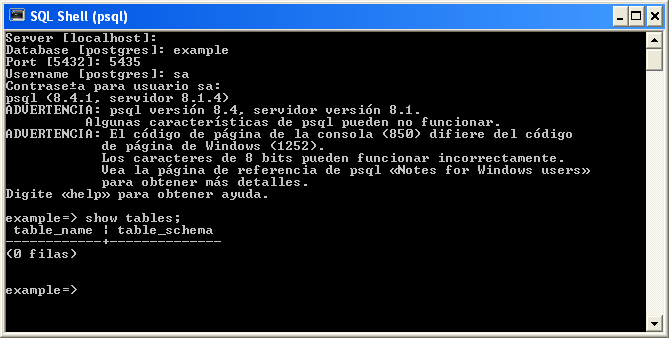
java -jar h2-1.3.163.jar -tcp -pg -baseDir /temp/db2
This command line means :
start h2 in server mode, allowing connections only from localhost setting root database to /temp/db2.
Other interesting options are:
-tcpPort 9101
-tcpAllowOthers
-pgAllowOthers
In order to create the database you must connect with admin user (SA and password recommended) for the very first time. For that you only need a jdbc connection.
If the database does not have a password for the SA user, you must set it with the folling command:
ALTER USER SA SET PASSWORD 'sa'
Then you can connect with a PostgreSQL client to the h2 database.
miércoles, 18 de abril de 2012
OpenSSL Cheat sheet
Today I have found a very interesting web page http://wiki.samat.org/CheatSheet/OpenSSL it contains a lot of interesting recipes with short descriptions about functionallity.
OPENSSL CA
Selfsigned CA:
Steps
1) Create private key
openssl genrsa -aes128 -passout pass:foobar -out keys/privkey.pem 2048
2) Create public key
openssl req -new -x509 -days 1001 -key keys/privkey.pem -passin pass:foobar -out ca.cer <<EOF
>ES
>Spain
>Madrid
>Test
>Security
>AutoridadVal
>tt@none.es
>EOF
Steps
1) Create private key
openssl genrsa -aes128 -passout pass:foobar -out keys/privkey.pem 2048
2) Create public key
openssl req -new -x509 -days 1001 -key keys/privkey.pem -passin pass:foobar -out ca.cer <<EOF
>ES
>Spain
>Madrid
>Test
>Security
>AutoridadVal
>tt@none.es
>EOF
Script for data encryption with openssl
#!/bin/bash
export data=$2
openssl enc -blowfish -e -a -pass pass:$1 <<EOF
$data
EOF
martes, 17 de abril de 2012
Changing unix password with a script
This script is a test, use it at your own risk
#!/bin/bash
export pass=$1
export user=$2
# we have assigned the data
passwd $user << END
$pass
$pass
END
domingo, 19 de febrero de 2012
Dasource deployment with Tomcat
Deploying a datasource shows the following error: org.apache.commons.dbcp.SQLNestedException: Cannot create JDBC driver of class '' for connect URL 'null', cause: java.sql.SQLException: No suitable driver Check if/conf/catalina/localhost/ is up to date with your current configuration. Check if your application has the datasource definition on META-INF/context.xml Check if both /conf/catalina/localhost/ and META-INF/context.xml match in the datasource definition.
Squid configuration samples
Http Authentication
debug_options ALL,9
http_port 80 accel defaultsite=wamp
cache_peer wamp parent 80 0 no-query originserver name=myAccel
external_acl_type ext_acl children=5 %PATH /etc/squid3/external_acl_test.sh admin123 paso123
acl script external ext_acl
acl aport port 80
http_access allow script aport
http_access deny all
For offline cache:
 visible_hostname www.demo.es


## DEF DE CACHES
cache_dir ufs /usr/local/squid/cache 200 16 256

## DEF DE LOGS
access_log /usr/local/squid/logs/access.log
cache_store_log /usr/local/squid/logs/store.log
cache_log /usr/local/squid/logs/cache.log
pid_filename /usr/local/squid/logs/squid.pid

## Directiva de configuracion
## se define el puerto de servicio 3380
## como acelerador y le decimos q se asocia a www.demo.es
http_port 3380 accel defaultsite=www.demo.es

## Directiva de configuracion
## el servidor que tiene los contenidos es localhost
## el cache es de tipo superior
## el puerto es el 80
## el puerto del icp no esta definido
## no se solicita ICP queries
## es un originserver
cache_peer localhost parent 80 0 no-query originserver name=myAccel

## Directiva de configuracion
##  definimos la acl "reverse_proxy" cuyo dstdomain es "www.demo.es"
acl reverse_proxy dstdomain www.demo.es


## Directiva de configuracion
## Directiva de configuracion
http_access allow reverse_proxy
offline_mode on


maximum_object_size 64 MB
refresh_pattern -i (/cgi-bin/|\?) 5 20% 20 ignore-no-store ignore-no-cache
Jailing environmente with chroot.
First: directory structure
 ./
.script.rc  bin  config  lib64  spool

./bin:
.lsd  bash  cat  init.rc  ls  sqlite3 echo

./config:
current

./lib64:
ld-linux-x86-64.so.2  libc.so.6        libpthread.so.0   libselinux.so.1
libacl.so.1           libdl.so.2       libreadline.so.5  libsqlite3.so.0
libattr.so.1          libncurses.so.5  librt.so.1

./spool:
commands
Second. Creating a custom console.
exec /usr/bin/rooted /var/cage /bin/init.rc
Third. Creating suid exec for chroot.
 cp /usr/bin/chroot /usr/bin/rooted
chmod u+s /usr/bin/rooted
Adendum. /bin/init.rc
/bin/bash --init-file /.script.rc
Suscribirse a:
Entradas (Atom)